A block heater that has the car warm right when you leave
A Home Assistant blueprint that starts a car block heater from your departure time and the outdoor temperature, and switches it off after you leave.
- Published
- Level
- Intermediate
- Hardware
- Matter outdoor smart plug, outdoor temperature sensor
In a Finnish winter the car is plugged in every night. A plain timer on the outlet heats for the same time whether it’s −2 °C or −25 °C, so the car is either cold or the heater runs for nothing. This setup starts heating a set number of minutes before you leave, picks those minutes from the outdoor temperature, and switches the heater off after you’ve driven away.
You set two things per car: the departure time and whether scheduled heating is on. Everything else follows.
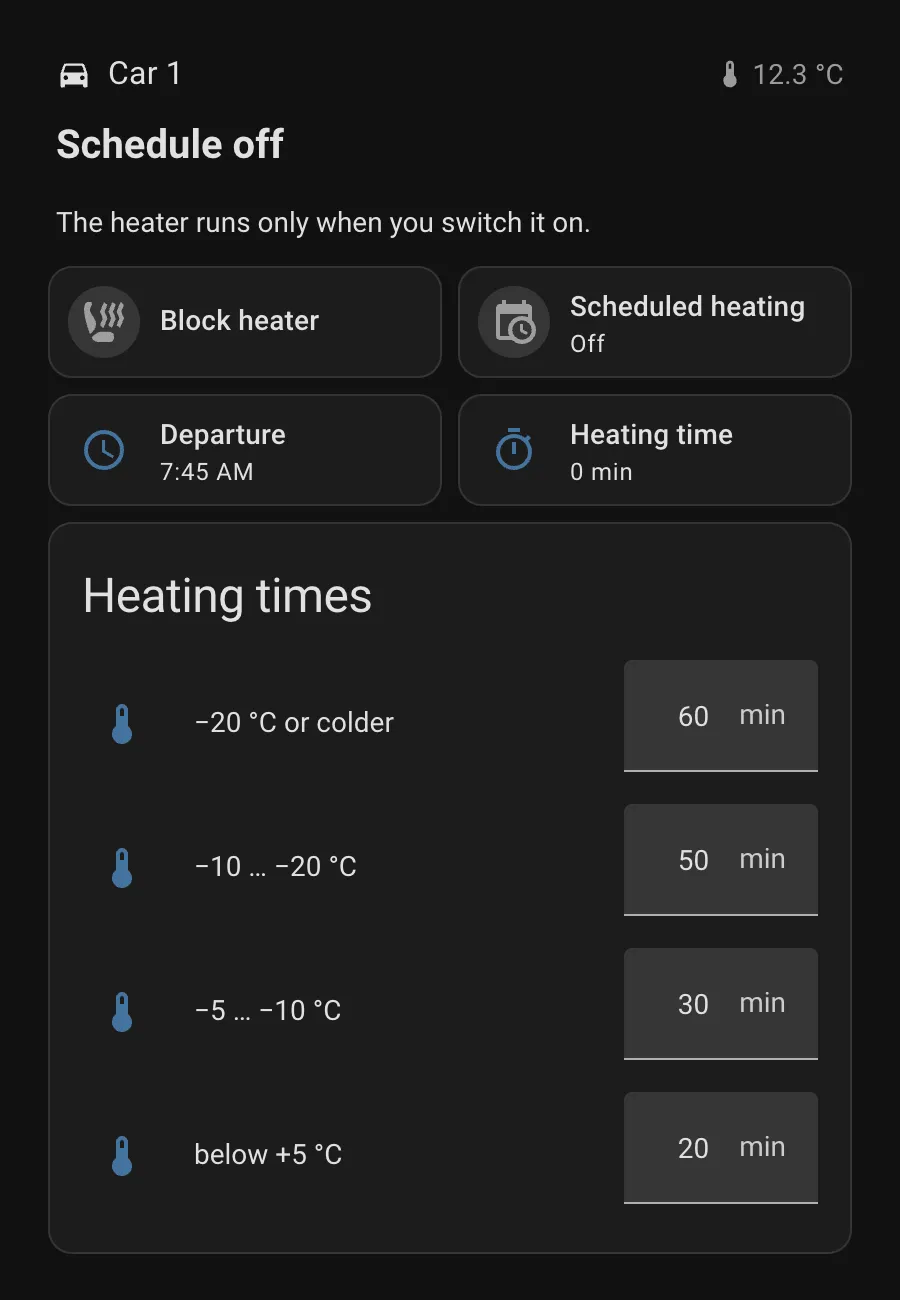
What it does
- Starts on time. Heating begins heating time minutes before departure. At +5 °C or warmer the heating time is zero and nothing runs.
- Stops after you leave. The heater switches off 15 minutes after the departure time.
- Handles manual starts. Switch the heater on by hand and it turns itself off after the heating time plus 15 minutes, so a forgotten heater never runs all day.
- Reacts to changes you make. Move the departure time so heating should already be running and it starts straight away.
- Doesn’t flip-flop with the weather. If it gets colder and the heating window now starts in the past, heating starts at once. Once heating has started, a warmer reading no longer cuts it short.
- Survives restarts. If Home Assistant restarts during a heating window, heating resumes. A heater left running after a restart is switched off by a five-minute safety check.
- Heating times are adjustable on the dashboard. One number per temperature band, no YAML editing.
- Leaves the heater alone when the schedule is off. Then it’s a plain smart plug.
What you need
- A smart plug rated for your block heater’s load and suitable for outdoor use. I use Matter outdoor plugs, but any plug that shows up as a
switchin Home Assistant works. - An outdoor temperature sensor in Home Assistant.
Step 1: helpers and heating time
The package below creates the departure time, the schedule toggle, four heating times (one per temperature band), and two template sensors: how many minutes to heat right now, and when heating starts. Save it as config/packages/car_block_heater.yaml and replace sensor.outdoor_temperature with your own sensor.
Show the package
# Car block heater: helpers and heating time.# Save as config/packages/car_block_heater.yaml (packages must be enabled in configuration.yaml).# Replace sensor.outdoor_temperature with your own outdoor temperature sensor.# For a second car, copy the block and change "car" to e.g. "car_2".
input_datetime:  car_departure_time:    name: Car departure time    has_date: false    has_time: true    icon: mdi:clock-outline
input_boolean:  car_heating_schedule:    name: Car scheduled heating    icon: mdi:calendar-clock
# Heating time for each temperature band. Adjust these from the dashboard;# Home Assistant remembers the values across restarts.input_number:  car_heating_minus_20:    name: Car heating time at −20 °C or colder    min: 0    max: 180    step: 5    mode: box    unit_of_measurement: min  car_heating_minus_10:    name: Car heating time at −10 to −20 °C    min: 0    max: 180    step: 5    mode: box    unit_of_measurement: min  car_heating_minus_5:    name: Car heating time at −5 to −10 °C    min: 0    max: 180    step: 5    mode: box    unit_of_measurement: min  car_heating_below_5:    name: Car heating time below +5 °C    min: 0    max: 180    step: 5    mode: box    unit_of_measurement: min
template:  - sensor:      # Minutes of heating at the current outdoor temperature, from the times above      - name: Car heating time        unique_id: car_heating_time        unit_of_measurement: min        icon: mdi:timer-outline        state: >          {% set t = states('sensor.outdoor_temperature') | float(99) %}          {% if t <= -20 %}{{ states('input_number.car_heating_minus_20') | int(0) }}          {% elif t <= -10 %}{{ states('input_number.car_heating_minus_10') | int(0) }}          {% elif t <= -5 %}{{ states('input_number.car_heating_minus_5') | int(0) }}          {% elif t < 5 %}{{ states('input_number.car_heating_below_5') | int(0) }}          {% else %}0          {% endif %}
      # When heating starts, for the dashboard      - name: Car heating starts        unique_id: car_heating_starts        icon: mdi:clock-start        state: >          {% set h = state_attr('input_datetime.car_departure_time', 'hour') | int(0) %}          {% set m = state_attr('input_datetime.car_departure_time', 'minute') | int(0) %}          {% set dep = h * 60 + m %}          {% set dur = states('sensor.car_heating_time') | int(0) %}          {% if dur == 0 %}none{% else %}          {% set start = (dep - dur) % 1440 %}          {{ '%02d:%02d' | format(start // 60, start % 60) }}          {% endif %}
Where to set the heating times: on the dashboard from step 4, in the Heating times card. You can also find them under Settings → Devices & services → Entities by searching for “heating time”. New helpers start at 0 minutes, which means no heating, so enter your times once after setting this up.
These are the values I use for one car:
| Outdoor temperature | Heating time |
|---|---|
| −20 °C or colder | 60 min |
| −10 °C … −20 °C | 50 min |
| −5 °C … −10 °C | 30 min |
| below +5 °C | 20 min |
| +5 °C or warmer | no heating |
My second car gets 90, 60, 45 and 30 minutes. For two cars, copy the package block and rename car to car_2.
Packages need to be enabled once in configuration.yaml:
homeassistant: packages: !include_dir_named packagesThen reload: Developer tools → YAML → Template entities, Input booleans, Input datetimes and Input numbers. A restart isn’t needed.
Step 2: the blueprint
The blueprint does the scheduling. Save it as config/blueprints/automation/automate_the_north/car_block_heater.yaml, then reload automations under Developer tools → YAML.
Show the blueprint
blueprint:  name: Car block heater by departure time  author: Automate the North  description: >    Switches a car engine block heater on so the car is warm at your departure time,    and off again shortly after you leave.

    **How it works**
    - Heating starts *heating time* minutes before the departure time. The heating    time comes from a sensor you choose (minutes), so you decide how long to heat    at each outdoor temperature. A heating time of 0 means no heating that day.
    - The heater switches off a few minutes after departure.
    - If you switch the heater on by hand, it switches itself off after the heating    time plus the after-departure buffer, so a forgotten heater never runs all day.
    - If you change the departure time so heating should already be running, it    starts immediately.
    - When the schedule toggle is off, this automation never touches the heater.  domain: automation  input:    heater:      name: Heater switch      description: The smart plug or relay that powers the block heater.      selector:        entity:          filter:            - domain: switch    departure_time:      name: Departure time      description: An input_datetime helper with time only.      selector:        entity:          filter:            - domain: input_datetime    schedule_enabled:      name: Scheduled heating toggle      description: An input_boolean that turns scheduled heating on or off.      selector:        entity:          filter:            - domain: input_boolean    heating_time:      name: Heating time sensor      description: A sensor whose state is the heating time in minutes, usually a template based on the outdoor temperature.      selector:        entity:          filter:            - domain: sensor    after_departure:      name: Keep heating after departure      description: Minutes the heater stays on after the departure time. Also the run time of a manual start on a warm day.      default: 15      selector:        number:          min: 0          max: 60          unit_of_measurement: min
mode: queuedmax: 10
trigger_variables:  heater: !input heater  departure: !input departure_time  heating_time: !input heating_time  buffer: !input after_departure
triggers:  # Departure minus heating time  - trigger: template    id: start    value_template: >      {% set dep = (state_attr(departure, 'hour') | int(0)) * 60 + (state_attr(departure, 'minute') | int(0)) %}      {% set dur = states(heating_time) | int(0) %}      {{ dur > 0 and (now().hour * 60 + now().minute) == (dep - dur) % 1440 }}  # Departure plus buffer  - trigger: template    id: end    value_template: >      {% set dep = (state_attr(departure, 'hour') | int(0)) * 60 + (state_attr(departure, 'minute') | int(0)) %}      {{ (now().hour * 60 + now().minute) == (dep + buffer | int(0)) % 1440 }}  # Any run (manual or scheduled) ends after heating time + buffer at the latest  - trigger: state    id: timeout    entity_id: !input heater    to: 'on'    for:      minutes: '{{ [states(heating_time) | int(0), 0] | max + buffer | int(0) }}'  # Settings changed: start right away if we're already inside the heating window  - trigger: state    id: settings    entity_id:      - !input departure_time      - !input schedule_enabled  # Heating time grew so that the window now includes the current minute  - trigger: state    id: heating_time    entity_id: !input heating_time  # After a restart: resume a heating window that started while HA was down  - trigger: homeassistant    id: ha_start    event: start  # Safety net for runs whose timer was lost in a restart  - trigger: time_pattern    id: watchdog    minutes: /5
conditions:  - condition: state    entity_id: !input schedule_enabled    state: 'on'
variables:  now_min: '{{ now().hour * 60 + now().minute }}'  dep_min: "{{ (state_attr(departure, 'hour') | int(0)) * 60 + (state_attr(departure, 'minute') | int(0)) }}"  end_min: '{{ (dep_min + buffer | int(0)) % 1440 }}'  # Is now_min inside [departure - heating time, departure + buffer)? Wraps past midnight.  in_window: >-    {%- set dur = states(heating_time) | int(0) -%}    {%- set start = (dep_min - dur) % 1440 -%}    {{ dur > 0 and ((start <= end_min and start <= now_min and now_min < end_min)       or (start > end_min and (now_min >= start or now_min < end_min))) }}  # Same test with the heating time before this change (only for heating_time triggers)  was_in_window: >-    {%- set dur = trigger.from_state.state | int(0) if trigger.id == 'heating_time' else 0 -%}    {%- set start = (dep_min - dur) % 1440 -%}    {{ dur > 0 and ((start <= end_min and start <= now_min and now_min < end_min)       or (start > end_min and (now_min >= start or now_min < end_min))) }}
actions:  - choose:      - conditions:          - condition: trigger            id: start          - condition: template            value_template: "{{ is_state(heater, 'off') }}"        sequence:          - action: switch.turn_on            target:              entity_id: !input heater
      - conditions:          - condition: trigger            id: [settings, heating_time, ha_start]          - condition: template            value_template: "{{ in_window | bool and not was_in_window | bool and is_state(heater, 'off') }}"        sequence:          - action: switch.turn_on            target:              entity_id: !input heater
      - conditions:          - condition: trigger            id: [end, timeout]          - condition: template            value_template: "{{ is_state(heater, 'on') }}"        sequence:          - action: switch.turn_off            target:              entity_id: !input heater
      # Heater left on outside the heating window for longer than a run may last      - conditions:          - condition: trigger            id: [watchdog, ha_start]          - condition: template            value_template: >-              {%- set on_min = (now() - states[heater].last_changed).total_seconds() / 60 -%}              {%- set limit = [states(heating_time) | int(0), 0] | max + buffer | int(0) -%}              {{ is_state(heater, 'on') and not in_window | bool and on_min >= limit }}        sequence:          - action: switch.turn_off            target:              entity_id: !input heater
Step 3: one automation per car
Go to Settings → Automations & scenes → Blueprints, pick Car block heater by departure time and fill in:
- Heater switch: your smart plug
- Departure time:
input_datetime.car_departure_time - Scheduled heating toggle:
input_boolean.car_heating_schedule - Heating time sensor:
sensor.car_heating_time
Save. For a second car, create another automation from the same blueprint with that car’s entities.
Step 4: the dashboard
This section uses only built-in cards. The top line tells you in plain words what happens next, such as “Heating starts at 06:55”. The Heating times card at the bottom is where you adjust the minutes for each temperature band. In a Sections view, add a section, open Edit in YAML and paste:
Show the dashboard YAML
# Dashboard section for one car. In a Sections view: add section → ⋮ → Edit in YAML, paste this.type: 'grid'cards: - type: 'heading' heading: 'Car' heading_style: 'title' icon: 'mdi:car' badges: - type: 'entity' entity: 'sensor.outdoor_temperature' name: 'Outside' show_name: false show_icon: true icon: 'mdi:thermometer' show_state: true - type: 'markdown' text_only: true content: |- {%- set t = states('sensor.outdoor_temperature') | float(none) -%} {%- set dur = states('sensor.car_heating_time') | int(0) -%} {%- set dep = states('input_datetime.car_departure_time')[:5] -%} {%- if is_state('switch.car_block_heater','on') and is_state('input_boolean.car_heating_schedule','off') -%} ## Heater on Scheduled heating is off, so the heater stays on until you switch it off. {%- elif is_state('switch.car_block_heater','on') -%} ## Heating now Ready for departure at {{ dep }}. {%- elif is_state('input_boolean.car_heating_schedule','off') -%} ## Schedule off The heater runs only when you switch it on. {%- elif dur == 0 -%} ## No heating needed It's {{ t | round(1) }} °C outside. The car is ready at {{ dep }} as it is. {%- else -%} ## Heating starts at {{ states('sensor.car_heating_starts') }} {{ dur }} minutes at {{ t | round(1) }} °C, warm by {{ dep }}. {%- endif -%} grid_options: columns: 'full' - type: 'tile' entity: 'switch.car_block_heater' name: 'Block heater' icon: 'mdi:car-seat-heater' vertical: false grid_options: columns: 6 tap_action: action: 'toggle' icon_tap_action: action: 'toggle' hide_state: true - type: 'tile' entity: 'input_boolean.car_heating_schedule' name: 'Scheduled heating' icon: 'mdi:calendar-clock' vertical: false grid_options: columns: 6 tap_action: action: 'toggle' icon_tap_action: action: 'toggle' - type: 'tile' entity: 'input_datetime.car_departure_time' name: 'Departure' icon: 'mdi:clock-outline' vertical: false grid_options: columns: 6 - type: 'tile' entity: 'sensor.car_heating_time' name: 'Heating time' icon: 'mdi:timer-outline' vertical: false grid_options: columns: 6 - type: 'entities' title: 'Heating times' state_color: false grid_options: columns: 'full' entities: - entity: 'input_number.car_heating_minus_20' name: '−20 °C or colder' icon: 'mdi:thermometer' - entity: 'input_number.car_heating_minus_10' name: '−10 … −20 °C' icon: 'mdi:thermometer' - entity: 'input_number.car_heating_minus_5' name: '−5 … −10 °C' icon: 'mdi:thermometer' - entity: 'input_number.car_heating_below_5' name: 'below +5 °C' icon: 'mdi:thermometer'The block heater tile hides its state on purpose. The icon colour and the status line already say whether it’s on.
Good to know
- Why the heating time is a sensor. The blueprint only needs a number of minutes. You can replace the temperature table with anything: wind chill, a different table for weekends, or a fixed value.
- A manual start never outlasts the departure by more than 15 minutes while scheduled heating is on. A heater you switch on 10 minutes before departure stops 15 minutes after departure, not a full heating cycle later.