Stop the ventilation when there's smoke outside
A Home Assistant smoke guard that compares your own particle sensor with official air quality readings and switches the ventilation off while the air is smoky.
- Published
- Level
- Intermediate
- Hardware
- Plantower PMS5003 particle sensor, ESP32-S3 with ESPHome, ventilation unit as a fan entity
On a still winter evening, smoke from wood stoves drifts low between the houses. A ventilation unit with heat recovery happily pulls it inside. This setup watches an outdoor particle sensor and switches the ventilation off while the air is smoky, then back on once it has cleared.
A fixed limit doesn’t work well. Some days the whole region has elevated particle levels, and a fixed limit would keep the ventilation off for hours. So the guard compares your own sensor with the official reading from the nearest air quality station. Smoke means your air is clearly worse than the area around you.
What it does
- Compares with the regional background. Smoke means your PM2.5 is above the larger of: 10 µg/m³, three times the official reading, or the official reading plus 10 µg/m³. A ceiling keeps the limit from climbing too high when the station itself is in smoke.
- Always reacts to heavy smoke. Above an absolute limit (50 µg/m³ for PM2.5, or 1.2 times that for PM10) it’s smoke regardless of the background.
- Falls back to fixed limits. If the official reading is missing or more than three hours old, the guard uses 10 µg/m³ to switch on and 8 µg/m³ to switch off.
- Doesn’t flap at the limit. It switches off a little lower than it switches on.
- Waits before restarting. The ventilation comes back on only after the air has stayed clean for 10 minutes. If smoke returns, the wait starts over.
- Steps aside when you take over. Switch the ventilation on yourself and the guard leaves it running until the next smoke alarm.
- Is adjustable on the dashboard. The factor, margin and limits are numbers you can change without editing YAML.
What you need
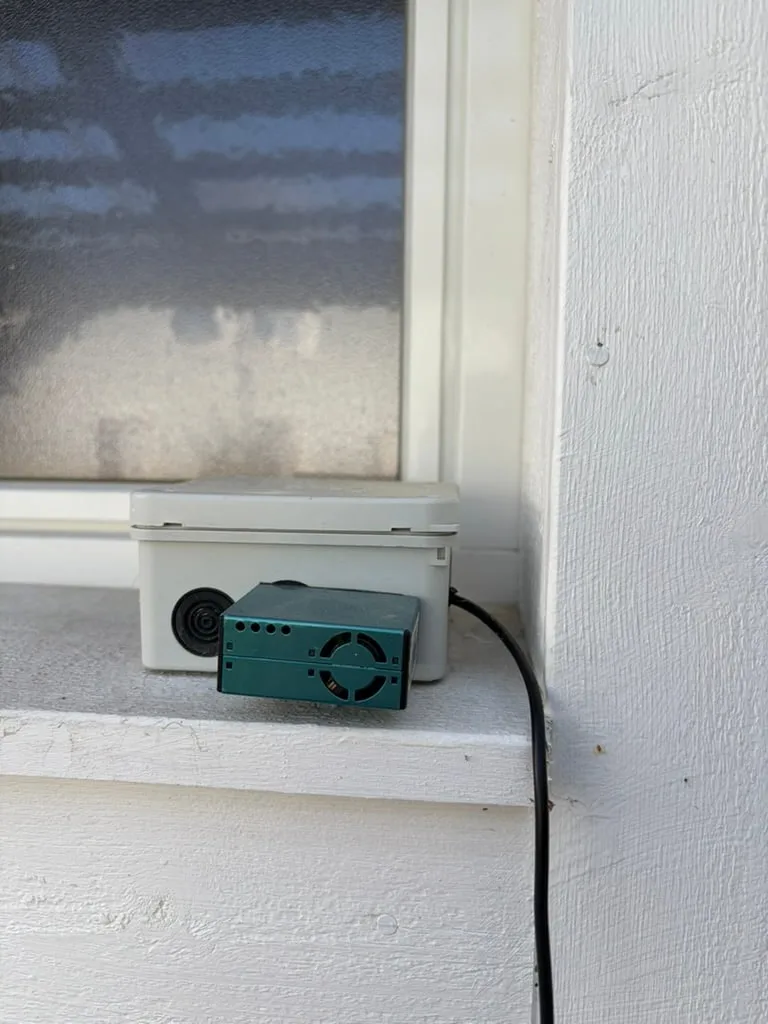
- An outdoor particle sensor that reports PM2.5 and PM10 in µg/m³. Mine is a Plantower PMS5003 outdoors, wired to an ESP32-S3 that runs ESPHome.
- A ventilation unit that shows up as a
fanentity. Mine is a Vallox; any unit Home Assistant can switch on and off works. - The ID of a nearby air quality station from the Finnish Meteorological Institute (FMI). Outside Finland, any official PM2.5 source works with a different REST sensor.
Vallox units. Home Assistant’s built-in Vallox integration talks to the unit directly over your local network, through the same HTTP interface the unit’s own web control uses. There’s no cloud and no Modbus adapter; you only give it the unit’s IP address. It creates the fan entity with the presets Home, Away, Boost, Fireplace, Extra and Auto, plus sensors for the temperatures, humidity, fan speeds, heat recovery efficiency and the filter’s remaining time. Mine is a Vallox 110 MV.
Step 1: find your air quality station
FMI publishes hourly PM2.5 averages from its air quality network as open data, with no API key. Open the station list in your browser:
https://opendata.fmi.fi/wfs?service=WFS&version=2.0.0&request=getFeature&storedquery_id=fmi::ef::stations&networkid=151Search the page for your town. The number in <gml:identifier ... fmisid> is the station ID. Not every station measures PM2.5, so test it: put the ID into the address in the package below and open it. If the reply contains PM25_PT1H_avg values, the station works.
Step 2: sensors and settings
The package creates the official background reading, a sensor for the current smoke limit, the smoke sensor itself, the guard toggle and four settings. Save it as config/packages/smoke_guard.yaml and replace YOUR_STATION_ID, sensor.outdoor_pm2_5 and sensor.outdoor_pm10.
Show the package
# Smoke guard: decides when outdoor air is smoky, compared with official regional readings.# Save as config/packages/smoke_guard.yaml (packages must be enabled in configuration.yaml).## Replace before use:# YOUR_STATION_ID FMI air quality station (fmisid) near you# sensor.outdoor_pm2_5 your own outdoor PM2.5 sensor (µg/m³)# sensor.outdoor_pm10 your own outdoor PM10 sensor (µg/m³)
# Official hourly PM averages from the Finnish Meteorological Institute (open data, no API key).# Values are published about an hour after the measurement hour.rest: - resource_template: >- https://opendata.fmi.fi/wfs?service=WFS&version=2.0.0&request=getFeature&storedquery_id=urban::observations::airquality::hourly::simple&fmisid=YOUR_STATION_ID¶meters=PM25_PT1H_avg,PM10_PT1H_avg&starttime={{ (utcnow() - timedelta(hours=4)).strftime('%Y-%m-%dT%H:00:00Z') }} scan_interval: 900 timeout: 30 sensor: - name: FMI background PM2.5 unique_id: fmi_background_pm2_5 unit_of_measurement: μg/m³ device_class: pm25 state_class: measurement value_template: > {% set m = value_json['wfs:FeatureCollection']['wfs:member'] | default([]) %} {% set m = m if m is list else [m] %} {% set v = m | map(attribute='BsWfs:BsWfsElement') | selectattr('BsWfs:ParameterName', 'eq', 'PM25_PT1H_avg') | rejectattr('BsWfs:ParameterValue', 'eq', 'NaN') | list %} {{ (v | last)['BsWfs:ParameterValue'] | float if v | count > 0 else none }} - name: FMI background measured unique_id: fmi_background_measured device_class: timestamp value_template: > {% set m = value_json['wfs:FeatureCollection']['wfs:member'] | default([]) %} {% set m = m if m is list else [m] %} {% set v = m | map(attribute='BsWfs:BsWfsElement') | selectattr('BsWfs:ParameterName', 'eq', 'PM25_PT1H_avg') | rejectattr('BsWfs:ParameterValue', 'eq', 'NaN') | list %} {{ (v | last)['BsWfs:Time'] if v | count > 0 else none }}
input_boolean: smoke_guard_enabled: name: Smoke guard icon: mdi:smoke-detector-variant # Set by the automation while it has switched the ventilation off smoke_guard_stopped: name: Smoke guard stopped the ventilation icon: mdi:fan-off
# Tuning, adjustable from the dashboard. Home Assistant remembers the values across restarts.input_number: smoke_guard_factor: name: Smoke guard factor min: 1.5 max: 6 step: 0.1 mode: box smoke_guard_margin: name: Smoke guard margin min: 0 max: 50 step: 1 mode: box unit_of_measurement: μg/m³ smoke_guard_limit_max: name: Smoke guard highest limit min: 15 max: 100 step: 1 mode: box unit_of_measurement: μg/m³ smoke_guard_absolute: name: Smoke guard absolute limit min: 20 max: 200 step: 5 mode: box unit_of_measurement: μg/m³
template: - sensor: # The PM2.5 level that counts as smoke right now - name: Smoke guard limit unique_id: smoke_guard_limit unit_of_measurement: μg/m³ device_class: pm25 state_class: measurement state: > {% set f = states('sensor.fmi_background_pm2_5') | float(none) %} {% set t = states('sensor.fmi_background_measured') %} {% set age_h = ((now() - as_datetime(t)).total_seconds() / 3600) if t not in ['unknown', 'unavailable', 'none', ''] else 99 %} {% set k = states('input_number.smoke_guard_factor') | float(3) %} {% set m = states('input_number.smoke_guard_margin') | float(10) %} {% set cap = states('input_number.smoke_guard_limit_max') | float(35) %} {% if f is none or age_h > 3 %}10 {% else %}{{ [[10, k * f, f + m] | max, cap] | min | round(1) }} {% endif %}
- binary_sensor: # On when the own sensor reads clearly above the regional background. Switches off a little # lower than it switches on, so a reading hovering at the limit doesn't flap. - name: Smoke guard smoke unique_id: smoke_guard_smoke device_class: smoke state: > {% set was_on = this.state == 'on' if this is defined else false %} {% set l = states('sensor.outdoor_pm2_5') | float(none) %} {% set l10 = states('sensor.outdoor_pm10') | float(none) %} {% set absolute = states('input_number.smoke_guard_absolute') | float(50) %} {% set f = states('sensor.fmi_background_pm2_5') | float(none) %} {% set t = states('sensor.fmi_background_measured') %} {% set age_h = ((now() - as_datetime(t)).total_seconds() / 3600) if t not in ['unknown', 'unavailable', 'none', ''] else 99 %} {% set k = states('input_number.smoke_guard_factor') | float(3) %} {% set m = states('input_number.smoke_guard_margin') | float(10) %} {% set cap = states('input_number.smoke_guard_limit_max') | float(35) %} {% if l is none %} {{ was_on }} {% elif l >= absolute or (l10 is not none and l10 >= absolute * 1.2) %} true {% elif f is none or age_h > 3 %} {# No fresh official reading: fall back to fixed limits #} {{ l > 8 if was_on else l >= 10 }} {% else %} {% set limit_on = [[10, k * f, f + m] | max, cap] | min %} {% set limit_off = [[8, (k - 0.5) * f, f + m * 0.6] | max, limit_on - 2] | min %} {{ l > limit_off if was_on else l >= limit_on }} {% endif %}Reload Template entities, Input booleans, Input numbers and RESTful under Developer tools → YAML. New number helpers start at their lowest value, so set these once from the dashboard in step 4:
| Setting | Value I use | What it means |
|---|---|---|
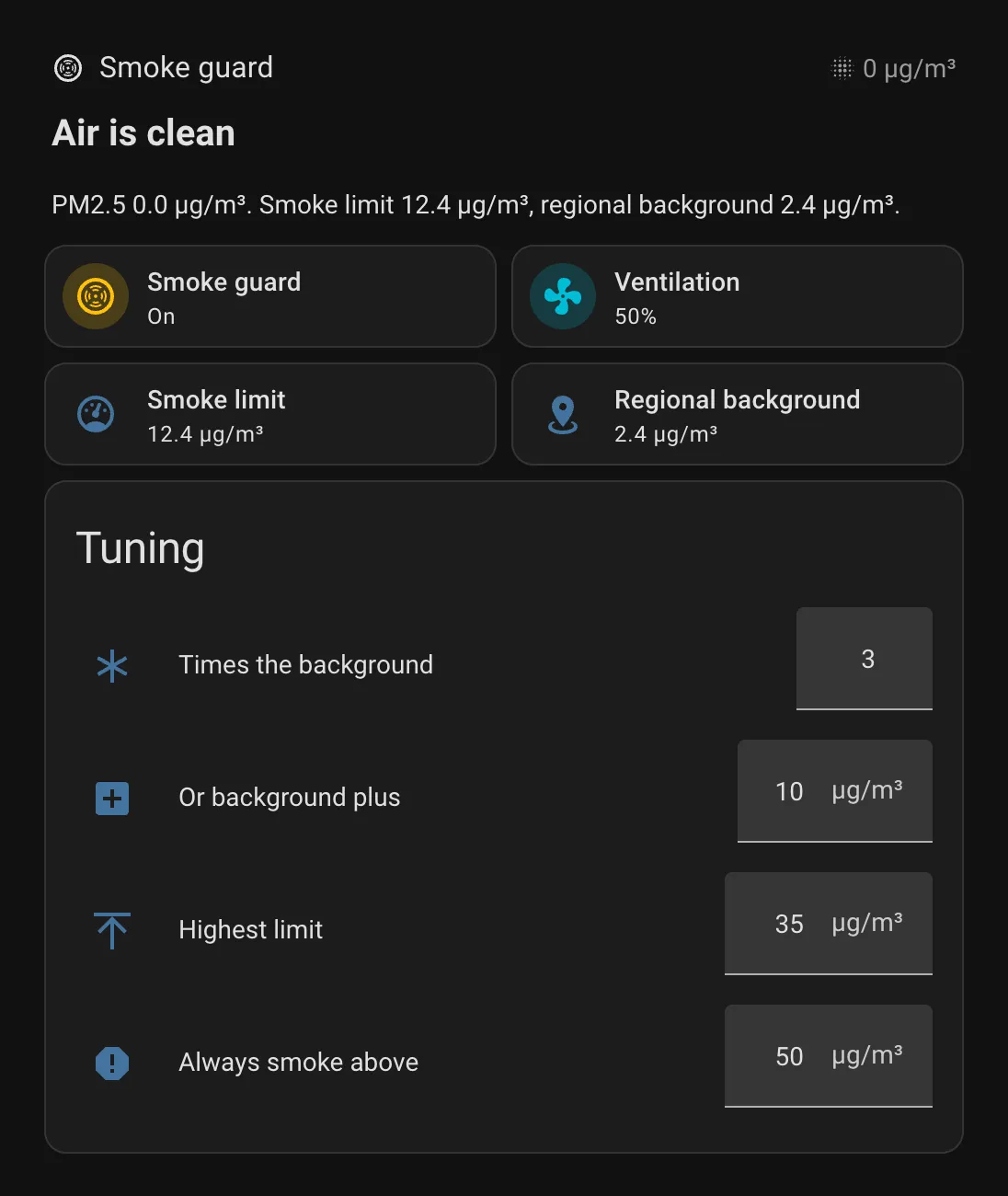
| Factor | 3 | Smoke when your PM2.5 is three times the background |
| Margin | 10 µg/m³ | …or the background plus this much |
| Highest limit | 35 µg/m³ | The limit never goes above this |
| Absolute | 50 µg/m³ | Above this it’s always smoke |
Step 3: the blueprint
The blueprint switches the ventilation. Save it as config/blueprints/automation/automate_the_north/smoke_guard.yaml and reload automations.
Import blueprint to Home Assistant(opens in a new tab)View on GitHub(opens in a new tab)
Show the blueprint
blueprint:  name: Smoke guard for ventilation  author: Automate the North  description: >    Switches the ventilation off when a smoke sensor turns on, and back on once the air has    stayed clean for a while.

    **How it works**
    - When the smoke sensor turns on, the ventilation switches off and a flag remembers that    this automation did it.
    - When the sensor has been off for the stabilisation time, the ventilation switches back on.    If smoke returns before that, the wait starts over.
    - If you switch the ventilation on yourself while it's stopped, the guard steps aside    until the next smoke alarm.
    - After a Home Assistant restart, a five-minute check finishes a wait that was cut short.
    - When the guard toggle is off, this automation never touches the ventilation.  source_url: https://github.com/automate-the-north/home-assistant/blob/main/blueprints/automation/automate_the_north/smoke_guard.yaml  domain: automation  input:    smoke:      name: Smoke sensor      description: A binary sensor that is on when the outdoor air is smoky.      selector:        entity:          filter:            - domain: binary_sensor    ventilation:      name: Ventilation      description: The ventilation unit as a fan entity.      selector:        entity:          filter:            - domain: fan    enabled:      name: Guard toggle      description: An input_boolean that turns the smoke guard on or off.      selector:        entity:          filter:            - domain: input_boolean    stopped:      name: Stopped flag      description: An input_boolean this automation turns on while it has the ventilation switched off.      selector:        entity:          filter:            - domain: input_boolean    stable_minutes:      name: Stabilisation time      description: How long the air must stay clean before the ventilation switches back on.      default: 10      selector:        number:          min: 1          max: 120          unit_of_measurement: min    on_stop:      name: Extra actions when stopped      description: Optional, for example a notification.      default: []      selector:        action: {}    on_start:      name: Extra actions when restarted      description: Optional, for example a notification.      default: []      selector:        action: {}
mode: queuedmax: 10
# trigger_variables are available in triggers (the 'for' below) as well as in actionstrigger_variables:  smoke: !input smoke  stopped: !input stopped  stable: !input stable_minutes
triggers:  - trigger: state    id: smoke    entity_id: !input smoke    to: 'on'  # Guard switched on while smoke is already present  - trigger: state    id: smoke    entity_id: !input enabled    to: 'on'  - trigger: state    id: clean    entity_id: !input smoke    to: 'off'    for:      minutes: '{{ stable | int(10) }}'  - trigger: state    id: manual    entity_id: !input ventilation    to: 'on'  # Finishes a wait that a restart cut short  - trigger: time_pattern    id: watchdog    minutes: /5
conditions:  - condition: state    entity_id: !input enabled    state: 'on'
actions:  - choose:      - conditions:          - condition: trigger            id: smoke          - condition: state            entity_id: !input smoke            state: 'on'          - condition: state            entity_id: !input stopped            state: 'off'        sequence:          - action: fan.turn_off            target:              entity_id: !input ventilation          - action: input_boolean.turn_on            target:              entity_id: !input stopped          - choose: []            default: !input on_stop
      - conditions:          - condition: trigger            id: [clean, watchdog]          - condition: state            entity_id: !input stopped            state: 'on'          - condition: template            value_template: >-              {{ is_state(smoke, 'off')                 and (now() - states[smoke].last_changed).total_seconds() >= stable | int(10) * 60 }}        sequence:          - action: input_boolean.turn_off            target:              entity_id: !input stopped          - action: fan.turn_on            target:              entity_id: !input ventilation          - choose: []            default: !input on_start
      # Switched on by hand (not by this automation) while stopped: step aside      - conditions:          - condition: trigger            id: manual          - condition: state            entity_id: !input stopped            state: 'on'          - condition: template            value_template: '{{ trigger.to_state.context.parent_id is none }}'        sequence:          - action: input_boolean.turn_off            target:              entity_id: !input stopped
Create an automation from Smoke guard for ventilation and pick:
- Smoke sensor:
binary_sensor.smoke_guard_smoke - Ventilation: your ventilation fan entity
- Guard toggle:
input_boolean.smoke_guard_enabled - Stopped flag:
input_boolean.smoke_guard_stopped
The optional extra actions are a good place for a phone notification when the ventilation stops and starts.
Step 4: the dashboard
The status line says in plain words what’s going on, such as “Air is clean” with the current limit, or “Ventilation stopped” with the reading that caused it. The Tuning card holds the four settings.
Show the dashboard YAML
# Dashboard section for the smoke guard. In a Sections view: add section → ⋮ → Edit in YAML, paste this.type: gridcards: - type: heading heading: Smoke guard heading_style: title icon: mdi:smoke-detector-variant badges: - type: entity entity: sensor.outdoor_pm2_5 show_icon: true icon: mdi:blur show_state: true - type: markdown text_only: true grid_options: columns: full content: |- {%- set l = states('sensor.outdoor_pm2_5') | float(none) -%} {%- set lim = states('sensor.smoke_guard_limit') | float(none) -%} {%- set f = states('sensor.fmi_background_pm2_5') | float(none) -%} {%- if is_state('input_boolean.smoke_guard_enabled', 'off') -%} ## Guard off The ventilation runs as usual and isn't switched off for smoke. {%- elif is_state('input_boolean.smoke_guard_stopped', 'on') and is_state('binary_sensor.smoke_guard_smoke', 'on') -%} ## Ventilation stopped Smoke outside: PM2.5 {{ l }} µg/m³, limit {{ lim }} µg/m³. {%- elif is_state('input_boolean.smoke_guard_stopped', 'on') -%} ## Air is clearing The ventilation restarts once the air has stayed clean for a while. {%- else -%} ## Air is clean PM2.5 {{ l }} µg/m³. Smoke limit {{ lim }} µg/m³{% if f is not none %}, regional background {{ f }} µg/m³{% endif %}. {%- endif -%} - type: tile entity: input_boolean.smoke_guard_enabled name: Smoke guard icon: mdi:smoke-detector-variant vertical: false grid_options: columns: 6 tap_action: action: toggle icon_tap_action: action: toggle - type: tile entity: fan.ventilation name: Ventilation vertical: false grid_options: columns: 6 - type: tile entity: sensor.smoke_guard_limit name: Smoke limit icon: mdi:gauge vertical: false grid_options: columns: 6 - type: tile entity: sensor.fmi_background_pm2_5 name: Regional background icon: mdi:map-marker-radius vertical: false grid_options: columns: 6 - type: entities title: Tuning state_color: false grid_options: columns: full entities: - entity: input_number.smoke_guard_factor name: Times the background - entity: input_number.smoke_guard_margin name: Or background plus - entity: input_number.smoke_guard_limit_max name: Highest limit - entity: input_number.smoke_guard_absolute name: Always smoke aboveGood to know
- Official readings lag about an hour. FMI publishes each hourly average roughly an hour later. The guard reacts to your own sensor straight away; the background only sets the limit.
- Cheap particle sensors read high in damp air. Optical sensors like the PMS5003 tend to overestimate in high humidity. That is one reason the limit is a multiple of the background rather than a small difference.
- If you get false alarms, raise the factor or the margin before changing the logic. If smoke goes unnoticed, lower them.