See what your district heating controller is doing
Read an Ouman H23 district heating controller into Home Assistant over Modbus, with a plain-language status, the heating curve and alarm alerts.
- Published
- Level
- Advanced
- Hardware
- Ouman H23 controller, Modbus TCP-to-RTU gateway
Many district heating substations are run by an Ouman H23 controller. It does its job well, but everything it knows sits behind a small display in the technical room: supply and return temperatures, what it’s aiming for, how far the valve is open, and whether an alarm is waiting.
This project reads all of that into Home Assistant over the controller’s Modbus port. You get the numbers on your dashboard, history graphs, and a notification when the controller raises an alarm or stops answering.
The project only reads. Nothing here changes the controller’s settings, and the heating keeps running exactly as before.
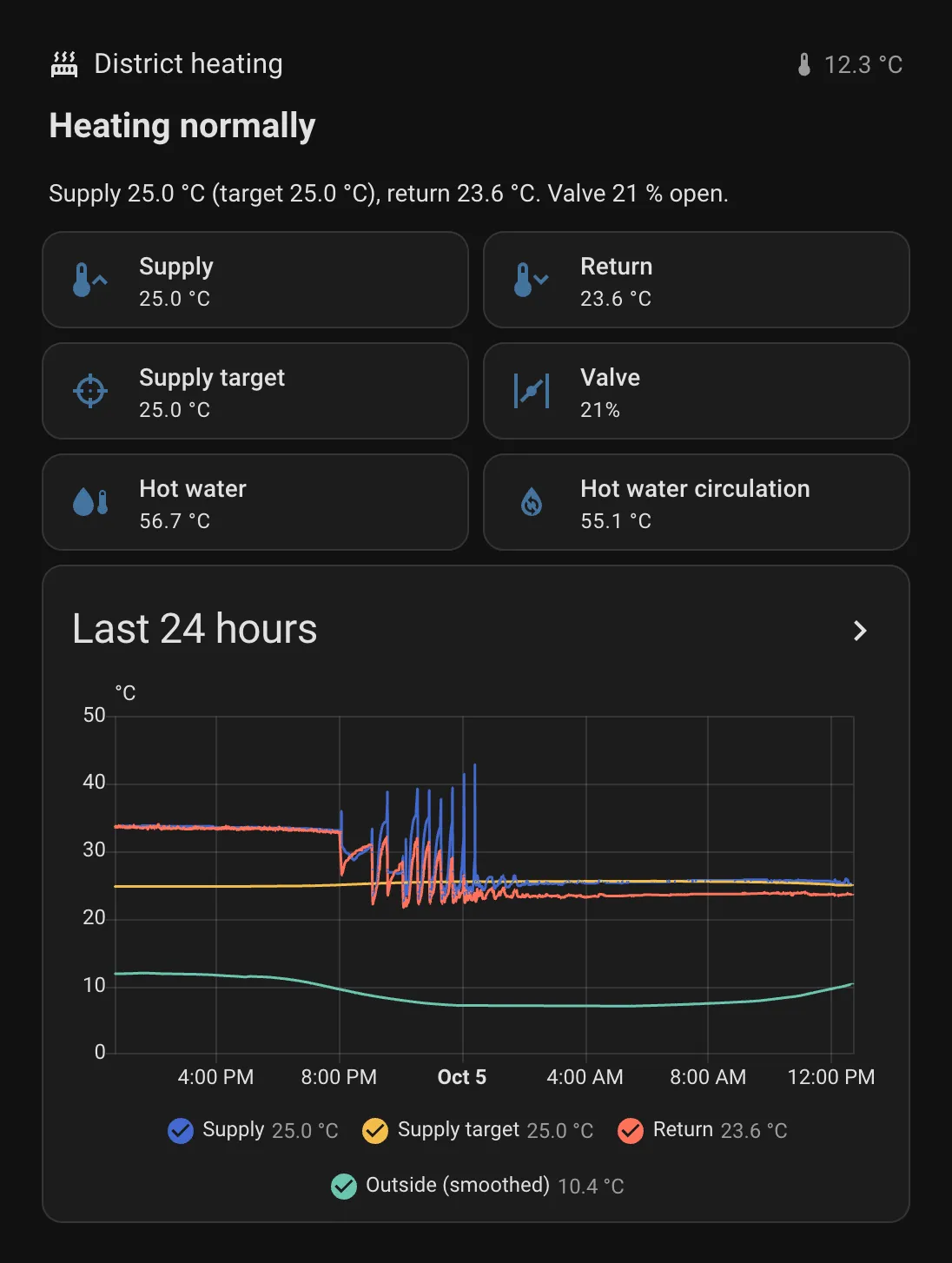
What it does
- Shows the heating circuit at a glance. Supply, return and target temperature, valve position, the temperature drop across the circuit, and how much room compensation is shifting the target.
- Shows the hot water side. Hot water supply and circulation temperatures, setpoint, valve position, and how much the circulation loop cools down.
- Reads the heating curve. The five curve points and the supply water limits, so you can see what the controller does at each outdoor temperature.
- Tells you what’s going on in plain words. The dashboard’s top line says “Heating normally”, “Summer shutdown” or names the active alarm.
- Alerts you. A small blueprint notifies you when any controller alarm turns on, or when the controller hasn’t answered for five minutes. You choose how: a Home Assistant notification by default, or for example a critical alert on your phone.
What you need
- An Ouman H23 controller. The register addresses below come from Ouman’s official H23 v2.0.1 Modbus register list.
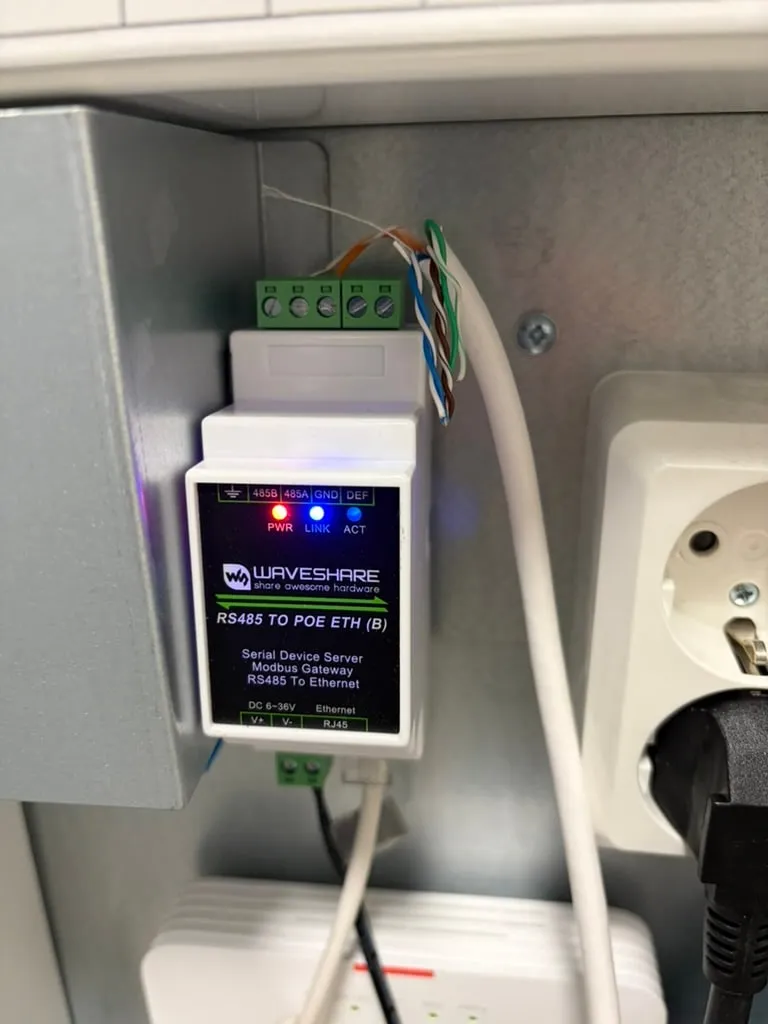
- A Modbus TCP-to-RTU gateway (an RS-485 to Ethernet converter) wired to the controller’s RS-485 port. I use a Waveshare RS485 TO POE ETH (B). It can be powered over Ethernet (PoE) or from a 6–36 V DC supply; mine runs on a separate power supply. Any gateway that turns Modbus TCP into Modbus RTU works.
- Home Assistant’s Modbus integration, which is configured in YAML.
Step 1: the gateway
Set the gateway to Modbus TCP server mode on port 502 and match its serial settings to the controller’s Modbus settings. Give the gateway a fixed address on your network. The controller’s Modbus address (slave) is 1 in the package; change it if yours differs.
Step 2: the package
Save the package as config/packages/ouman_h23.yaml. It creates the Modbus sensors, a few calculated values and a binary sensor for each alarm. The gateway’s address goes into secrets.yaml:
ouman_host: 192.168.1.50Show the package
# Ouman H23 district heating controller over Modbus: read-only monitoring.# Save as config/packages/ouman_h23.yaml (packages must be enabled in configuration.yaml).## Connection: a Modbus TCP-to-RTU gateway (RS-485 to Ethernet) wired to the H23's RS-485 port.# Put the gateway's address in secrets.yaml, for example:  ouman_host: 192.168.1.50 Register addresses follow the official# H23 v2.0.1 Modbus register list. Values are 32-bit, read here as the low 16-bit word,# which covers every value this package uses.## L1 = heating circuit 1, DHW = domestic hot water.# This package only reads. Nothing here writes to the controller.# Alarm and connection notifications: blueprint heating_controller_watchdog.yaml.## Some unique_ids are in Finnish: they come from the first version of this package and# are kept so that upgraded installs keep their entity IDs and history.
modbus:  - name: ouman_h23    type: tcp    host: !secret ouman_host    port: 502    delay: 1    timeout: 5
    sensors:      # ---------- Measurements ----------      - name: Ouman outdoor temperature        unique_id: ouman_h23_ulko        slave: 1        address: 201        input_type: holding        data_type: int16        scale: 0.1        precision: 1        unit_of_measurement: °C        device_class: temperature        state_class: measurement
      - name: Ouman L1 supply temperature        unique_id: ouman_h23_l1_meno        slave: 1        address: 203        input_type: holding        data_type: int16        scale: 0.1        precision: 1        unit_of_measurement: °C        device_class: temperature        state_class: measurement
      - name: Ouman L1 return temperature        unique_id: ouman_h23_l1_paluu        slave: 1        address: 205        input_type: holding        data_type: int16        scale: 0.1        precision: 1        unit_of_measurement: °C        device_class: temperature        state_class: measurement
      - name: Ouman DHW supply temperature        unique_id: ouman_h23_lv_meno        slave: 1        address: 215        input_type: holding        data_type: int16        scale: 0.1        precision: 1        unit_of_measurement: °C        device_class: temperature        state_class: measurement
      - name: Ouman DHW circulation temperature        unique_id: ouman_h23_lv_kierto        slave: 1        address: 217        input_type: holding        data_type: int16        scale: 0.1        precision: 1        unit_of_measurement: °C        device_class: temperature        state_class: measurement
      # ---------- Control ----------      - name: Ouman L1 supply setpoint        unique_id: ouman_h23_l1_asetus_laskennall        slave: 1        address: 285 # calculated supply water setpoint        input_type: holding        data_type: int16        scale: 0.1        precision: 1        unit_of_measurement: °C        device_class: temperature        state_class: measurement
      - name: Ouman L1 setpoint from curve        unique_id: ouman_h23_l1_kayra        slave: 1        address: 287 # supply water according to the heating curve        input_type: holding        data_type: int16        scale: 0.1        precision: 1        unit_of_measurement: °C        device_class: temperature        state_class: measurement
      - name: Ouman L1 valve position        unique_id: ouman_h23_l1_venttiili_asento        slave: 1        address: 613        input_type: holding        data_type: int16        unit_of_measurement: '%'        state_class: measurement
      - name: Ouman L1 summer shutdown raw        unique_id: ouman_h23_l1_kesasulku        slave: 1        address: 293 # 1 = summer shutdown active        input_type: holding        data_type: uint16
      - name: Ouman DHW setpoint        unique_id: ouman_h23_lv_asetus        slave: 1        address: 593        input_type: holding        data_type: int16        scale: 0.1        precision: 1        unit_of_measurement: °C        device_class: temperature        state_class: measurement      - name: Ouman DHW valve position        unique_id: ouman_h23_lv_venttiili        slave: 1        address: 225        input_type: holding        data_type: int16        unit_of_measurement: '%'        state_class: measurement
      - name: Ouman delayed outdoor temperature        unique_id: ouman_h23_ulko_hidastettu        slave: 1        address: 279 # the smoothed outdoor value the controller actually uses        input_type: holding        data_type: int16        scale: 0.1        precision: 1        unit_of_measurement: °C        device_class: temperature        state_class: measurement        scan_interval: 60
      # ---------- L1 heating curve (whole degrees, read every 10 min) ----------      # The end points are fixed at -20 °C and +20 °C outdoors.
      # How much room compensation is shifting the supply setpoint right now      - name: Ouman L1 room compensation effect        unique_id: ouman_h23_l1_huonekomp_vaikutus        slave: 1        address: 289        input_type: holding        data_type: int16        scale: 0.1        precision: 1        unit_of_measurement: °C        state_class: measurement        scan_interval: 60      - name: Ouman L1 curve point 1 supply        unique_id: ouman_h23_l1_kayra_out1        slave: 1        address: 502        input_type: holding        data_type: int16        unit_of_measurement: °C        scan_interval: 600      - name: Ouman L1 curve point 2 outdoor        unique_id: ouman_h23_l1_kayra_in2        slave: 1        address: 504        input_type: holding        data_type: int16        unit_of_measurement: °C        scan_interval: 600      - name: Ouman L1 curve point 2 supply        unique_id: ouman_h23_l1_kayra_out2        slave: 1        address: 506        input_type: holding        data_type: int16        unit_of_measurement: °C        scan_interval: 600      - name: Ouman L1 curve point 3 outdoor        unique_id: ouman_h23_l1_kayra_in3        slave: 1        address: 508        input_type: holding        data_type: int16        unit_of_measurement: °C        scan_interval: 600      - name: Ouman L1 curve point 3 supply        unique_id: ouman_h23_l1_kayra_out3        slave: 1        address: 510        input_type: holding        data_type: int16        unit_of_measurement: °C        scan_interval: 600      - name: Ouman L1 curve point 4 outdoor        unique_id: ouman_h23_l1_kayra_in4        slave: 1        address: 512        input_type: holding        data_type: int16        unit_of_measurement: °C        scan_interval: 600      - name: Ouman L1 curve point 4 supply        unique_id: ouman_h23_l1_kayra_out4        slave: 1        address: 514        input_type: holding        data_type: int16        unit_of_measurement: °C        scan_interval: 600      - name: Ouman L1 curve point 5 supply        unique_id: ouman_h23_l1_kayra_out5        slave: 1        address: 516        input_type: holding        data_type: int16        unit_of_measurement: °C        scan_interval: 600      - name: Ouman L1 supply minimum        unique_id: ouman_h23_l1_meno_min        slave: 1        address: 518        input_type: holding        data_type: int16        unit_of_measurement: °C        scan_interval: 600      - name: Ouman L1 supply maximum        unique_id: ouman_h23_l1_meno_max        slave: 1        address: 520        input_type: holding        data_type: int16        unit_of_measurement: °C        scan_interval: 600
      # ---------- Alarms (raw; bit 0 = active) ----------      - name: Ouman alarm raw DHW high temperature        unique_id: ouman_h23_alarm_lv_ylalampo        slave: 1        address: 532        input_type: holding        data_type: uint16      - name: Ouman alarm raw L1 supply deviation        unique_id: ouman_h23_alarm_l1_poikkeama        slave: 1        address: 533        input_type: holding        data_type: uint16      - name: Ouman alarm raw L1 return low        unique_id: ouman_h23_alarm_l1_paluu_ala        slave: 1        address: 674        input_type: holding        data_type: uint16      - name: Ouman alarm raw sensor M1 outdoor        unique_id: ouman_h23_alarm_m1        slave: 1        address: 643        input_type: holding        data_type: uint16      - name: Ouman alarm raw sensor M2 L1 supply        unique_id: ouman_h23_alarm_m2        slave: 1        address: 644        input_type: holding        data_type: uint16      - name: Ouman alarm raw sensor M3 L1 return        unique_id: ouman_h23_alarm_m3        slave: 1        address: 645        input_type: holding        data_type: uint16      - name: Ouman alarm raw sensor M8 DHW supply        unique_id: ouman_h23_alarm_m8        slave: 1        address: 650        input_type: holding        data_type: uint16      - name: Ouman alarm raw sensor M9 DHW circulation        unique_id: ouman_h23_alarm_m9        slave: 1        address: 651        input_type: holding        data_type: uint16
template:  - sensor:      # Supply minus return: how much heat the radiators or floor loops take out      - name: Ouman L1 temperature drop        unique_id: ouman_h23_l1_dt        unit_of_measurement: °C        state_class: measurement        state: >          {{ (states('sensor.ouman_l1_supply_temperature') | float              - states('sensor.ouman_l1_return_temperature') | float) | round(1) }}        availability: >          {{ has_value('sensor.ouman_l1_supply_temperature')             and has_value('sensor.ouman_l1_return_temperature') }}
      # Measured supply minus setpoint: positive = warmer than asked      - name: Ouman L1 control error        unique_id: ouman_h23_l1_saatovirhe        unit_of_measurement: °C        state_class: measurement        state: >          {{ (states('sensor.ouman_l1_supply_temperature') | float              - states('sensor.ouman_l1_supply_setpoint') | float) | round(1) }}        availability: >          {{ has_value('sensor.ouman_l1_supply_temperature')             and has_value('sensor.ouman_l1_supply_setpoint') }}
      # Hot water supply minus circulation return: heat lost in the circulation loop      - name: Ouman DHW temperature drop        unique_id: ouman_h23_lv_dt        unit_of_measurement: °C        state_class: measurement        state: >          {{ (states('sensor.ouman_dhw_supply_temperature') | float              - states('sensor.ouman_dhw_circulation_temperature') | float) | round(1) }}        availability: >          {{ has_value('sensor.ouman_dhw_supply_temperature')             and has_value('sensor.ouman_dhw_circulation_temperature') }}
  - binary_sensor:      - name: Ouman L1 summer shutdown        unique_id: ouman_h23_bs_l1_kesasulku        state: "{{ states('sensor.ouman_l1_summer_shutdown_raw') | int(0) == 1 }}"
      - name: Ouman alarm DHW high temperature        unique_id: ouman_h23_bs_lv_ylalampo        device_class: problem        state: "{{ states('sensor.ouman_alarm_raw_dhw_high_temperature') | int(0) % 2 == 1 }}"      - name: Ouman alarm L1 supply deviation        unique_id: ouman_h23_bs_l1_poikkeama        device_class: problem        state: "{{ states('sensor.ouman_alarm_raw_l1_supply_deviation') | int(0) % 2 == 1 }}"      - name: Ouman alarm L1 return low        unique_id: ouman_h23_bs_l1_paluu_ala        device_class: problem        state: "{{ states('sensor.ouman_alarm_raw_l1_return_low') | int(0) % 2 == 1 }}"      - name: Ouman sensor fault M1 outdoor        unique_id: ouman_h23_bs_m1        device_class: problem        state: "{{ states('sensor.ouman_alarm_raw_sensor_m1_outdoor') | int(0) % 2 == 1 }}"      - name: Ouman sensor fault M2 L1 supply        unique_id: ouman_h23_bs_m2        device_class: problem        state: "{{ states('sensor.ouman_alarm_raw_sensor_m2_l1_supply') | int(0) % 2 == 1 }}"      - name: Ouman sensor fault M3 L1 return        unique_id: ouman_h23_bs_m3        device_class: problem        state: "{{ states('sensor.ouman_alarm_raw_sensor_m3_l1_return') | int(0) % 2 == 1 }}"      - name: Ouman sensor fault M8 DHW supply        unique_id: ouman_h23_bs_m8        device_class: problem        state: "{{ states('sensor.ouman_alarm_raw_sensor_m8_dhw_supply') | int(0) % 2 == 1 }}"      - name: Ouman sensor fault M9 DHW circulation        unique_id: ouman_h23_bs_m9        device_class: problem        state: "{{ states('sensor.ouman_alarm_raw_sensor_m9_dhw_circulation') | int(0) % 2 == 1 }}"
      # No answer from the controller for 5 minutes      - name: Ouman connection lost        unique_id: ouman_h23_bs_offline        device_class: problem        state: "{{ not has_value('sensor.ouman_outdoor_temperature') }}"        delay_on:          minutes: 5
      - name: Ouman any alarm        unique_id: ouman_h23_bs_any_alarm        device_class: problem        state: >          {{ ['binary_sensor.ouman_alarm_dhw_high_temperature',              'binary_sensor.ouman_alarm_l1_supply_deviation',              'binary_sensor.ouman_alarm_l1_return_low',              'binary_sensor.ouman_sensor_fault_m1_outdoor',              'binary_sensor.ouman_sensor_fault_m2_l1_supply',              'binary_sensor.ouman_sensor_fault_m3_l1_return',              'binary_sensor.ouman_sensor_fault_m8_dhw_supply',              'binary_sensor.ouman_sensor_fault_m9_dhw_circulation']             | select('is_state', 'on') | list | count > 0 }}
Packages need to be enabled once in configuration.yaml:
homeassistant: packages: !include_dir_named packagesAdding Modbus for the first time needs a restart of Home Assistant. After that, Developer tools → YAML → Modbus reloads changes without one.
Step 3: alerts
The alerts come from a blueprint, so you can set them up and change them in the UI. Pick binary_sensor.ouman_any_alarm as the alarm sensor and binary_sensor.ouman_connection_lost as the connection sensor, and choose what happens in each case.
Import blueprint to Home Assistant(opens in a new tab)View on GitHub(opens in a new tab)
Show the blueprint
blueprint:  name: Heating controller alarm and connection watchdog  author: Automate the North  description: >    Notifies when a heating controller raises an alarm or stops answering. Made for    the Ouman H23 package, but works with any pair of binary sensors: one that is on    while any alarm is active, and one that is on while the connection is lost.

    By default it creates a Home Assistant notification. Replace the actions with    your own, for example a phone notification or a script that sends a critical    alert.  source_url: https://github.com/automate-the-north/home-assistant/blob/main/blueprints/automation/automate_the_north/heating_controller_watchdog.yaml  domain: automation  input:    alarm:      name: Alarm sensor      description: A binary sensor that is on while any controller alarm is active.      selector:        entity:          filter:            - domain: binary_sensor    connection_lost:      name: Connection lost sensor      description: A binary sensor that is on while the controller doesn't answer.      selector:        entity:          filter:            - domain: binary_sensor    on_alarm:      name: Actions on alarm      default:        - action: persistent_notification.create          data:            title: Heating controller alarm            message: The heating controller reports an active alarm. Check the controller.      selector:        action: {}    on_connection_lost:      name: Actions when the connection is lost      default:        - action: persistent_notification.create          data:            title: Heating controller not answering            message: >-              No answer from the heating controller. Heating keeps running on the              controller's own control, but Home Assistant can't see it.      selector:        action: {}
mode: queuedmax: 10
triggers:  - trigger: state    id: alarm    entity_id: !input alarm    to: 'on'  - trigger: state    id: connection_lost    entity_id: !input connection_lost    to: 'on'
actions:  - choose:      - conditions:          - condition: trigger            id: alarm        sequence: !input on_alarm      - conditions:          - condition: trigger            id: connection_lost        sequence: !input on_connection_lost
I use a script that sends a critical alert to my phone, which gets through even when the phone is on silent.
Step 4: the dashboard
This section uses only built-in cards: a status line, six tiles and a 24-hour graph of supply, target, return and outdoor temperature. In a Sections view, add a section, open Edit in YAML and paste:
Show the dashboard YAML
# Dashboard section for the Ouman H23. In a Sections view: add section → ⋮ → Edit in YAML, paste this.type: gridcards: - type: heading heading: 'District heating' heading_style: title icon: mdi:radiator badges: - type: entity entity: sensor.ouman_outdoor_temperature name: 'Outside' icon: mdi:thermometer show_name: false show_state: true - type: markdown text_only: true grid_options: columns: full content: |- {%- macro t(e) -%}{{ (states(e) | float | round(1) | string) if has_value(e) else '–' }}{%- endmacro -%} {%- set active = [ ('binary_sensor.ouman_alarm_dhw_high_temperature', 'hot water too hot'), ('binary_sensor.ouman_alarm_l1_supply_deviation', 'supply temperature off target'), ('binary_sensor.ouman_alarm_l1_return_low', 'return temperature too low'), ('binary_sensor.ouman_sensor_fault_m1_outdoor', 'outdoor sensor fault'), ('binary_sensor.ouman_sensor_fault_m2_l1_supply', 'supply sensor fault'), ('binary_sensor.ouman_sensor_fault_m3_l1_return', 'return sensor fault'), ('binary_sensor.ouman_sensor_fault_m8_dhw_supply', 'hot water sensor fault'), ('binary_sensor.ouman_sensor_fault_m9_dhw_circulation', 'circulation sensor fault') ] | selectattr(0, 'is_state', 'on') | map(attribute=1) | list -%} {%- if is_state('binary_sensor.ouman_connection_lost', 'on') -%} ## No connection to the controller Heating keeps running on the controller's own control. Check the Modbus gateway. {%- elif active -%} ## Alarm: {{ active | join(', ') }} Check the controller. {%- elif is_state('binary_sensor.ouman_l1_summer_shutdown', 'on') -%} ## Summer shutdown Space heating is off. Hot water is {{ t('sensor.ouman_dhw_supply_temperature') }} °C. {%- else -%} ## Heating normally Supply {{ t('sensor.ouman_l1_supply_temperature') }} °C (target {{ t('sensor.ouman_l1_supply_setpoint') }} °C), return {{ t('sensor.ouman_l1_return_temperature') }} °C. Valve {{ states('sensor.ouman_l1_valve_position') }} % open. {%- endif -%} - type: tile entity: sensor.ouman_l1_supply_temperature name: 'Supply' icon: mdi:thermometer-chevron-up vertical: false grid_options: columns: 6 - type: tile entity: sensor.ouman_l1_return_temperature name: 'Return' icon: mdi:thermometer-chevron-down vertical: false grid_options: columns: 6 - type: tile entity: sensor.ouman_l1_supply_setpoint name: 'Supply target' icon: mdi:target vertical: false grid_options: columns: 6 - type: tile entity: sensor.ouman_l1_valve_position name: 'Valve' icon: mdi:valve vertical: false grid_options: columns: 6 - type: tile entity: sensor.ouman_dhw_supply_temperature name: 'Hot water' icon: mdi:water-thermometer vertical: false grid_options: columns: 6 - type: tile entity: sensor.ouman_dhw_circulation_temperature name: 'Hot water circulation' icon: mdi:water-sync vertical: false grid_options: columns: 6 - type: history-graph title: 'Last 24 hours' hours_to_show: 24 grid_options: columns: full entities: - entity: sensor.ouman_l1_supply_temperature name: 'Supply' - entity: sensor.ouman_l1_supply_setpoint name: 'Supply target' - entity: sensor.ouman_l1_return_temperature name: 'Return' - entity: sensor.ouman_delayed_outdoor_temperature name: 'Outside (smoothed)'Good to know
- How the registers are read. Every value in the register list is 32 bits, split over two registers. The package reads the lower register as a 16-bit integer, which covers values up to ±3276.7 °C at a scale of 0.1, more than enough for anything here. The register list numbers registers from 1, and the package uses those numbers as they are.
- Alarm registers are bit fields. An alarm is active when bit 0 is set, so the binary sensors test for an odd value. The other bits carry other information: with no alarm active, the raw values here are typically 36 or 40.
- The delayed outdoor temperature is the one that counts. The controller smooths the outdoor reading before using it, so the delayed value explains why the supply target lags behind sudden weather changes.