Ventilation that boosts on CO₂ and rests when you're away
One Home Assistant blueprint boosts the ventilation when bedroom CO₂ rises at night and switches to the away setting when nobody is home.
- Published
- Level
- Beginner
- Hardware
- Sensirion SCD41 CO₂ sensor, ESP32 with ESPHome, ventilation unit with presets
A bedroom with the door closed gets stuffy overnight, while the rest of the house is fine. Running the ventilation on boost all night wastes heat; running it on normal leaves you waking up to stale air. This automation boosts only when a CO₂ sensor says it’s needed, and only during the hours that matter. When everyone leaves, the ventilation drops to its away setting.
What it does
- Boosts on CO₂. During the boost hours (23:00–12:00 in my case, for a bedroom sensor), CO₂ above the upper limit switches the ventilation to boost.
- Returns to normal on its own. Once CO₂ has stayed below the lower limit for 10 minutes, or the boost hours end, it goes back to the home setting.
- Rests when nobody is home. When the last person leaves, the ventilation switches to away. When someone comes home, it returns to home.
- Uses the home zone, not names. “Nobody home” means the home zone’s count is zero, so it works for any number of people without listing them.
- Can be switched off. A toggle stops CO₂ boosting and ends a running boost. Away mode keeps working.
What you need
- A CO₂ sensor in the room that matters. Mine is a Sensirion SCD41 in the bedroom, wired to an ESP32 that runs ESPHome. The SCD41 also measures temperature and humidity.
- A ventilation unit that shows up as a
fanentity with presets. Mine is a Vallox with the presets Home, Away and Boost. - People tracked by the Home Assistant app or another device tracker, so the home zone knows who’s in.
Vallox units. Home Assistant’s built-in Vallox integration talks to the unit directly over your local network, through the same HTTP interface the unit’s own web control uses. There’s no cloud and no Modbus adapter; you only give it the unit’s IP address. It creates the fan entity with the presets Home, Away, Boost, Fireplace, Extra and Auto, plus sensors for the temperatures, humidity, fan speeds, heat recovery efficiency and the filter’s remaining time. Mine is a Vallox 110 MV.
Step 1: helpers
The package creates the boost toggle and the two CO₂ limits. Save it as config/packages/ventilation_co2.yaml and reload Input booleans and Input numbers under Developer tools → YAML.
# Ventilation: CO₂ boost and away mode. Helpers used by the# "Ventilation boost by CO2, away mode by presence" blueprint.# Save as config/packages/ventilation_co2.yaml (packages must be enabled in configuration.yaml).
input_boolean:  co2_boost_enabled:    name: CO₂ boost    icon: mdi:fan-plus
# Limits, adjustable from the dashboard. Home Assistant remembers the values across restarts.input_number:  co2_boost_above:    name: CO₂ boost starts above    min: 500    max: 2000    step: 50    mode: box    unit_of_measurement: ppm  co2_boost_below:    name: CO₂ boost ends below    min: 400    max: 1500    step: 50    mode: box    unit_of_measurement: ppm
New number helpers start at their lowest value. I use 850 ppm to start a boost and 700 ppm to end it; set yours once from the dashboard.
Step 2: the blueprint
Save it as config/blueprints/automation/automate_the_north/ventilation_co2_presence.yaml and reload automations.
Import blueprint to Home Assistant(opens in a new tab)View on GitHub(opens in a new tab)
Show the blueprint
blueprint:  name: Ventilation boost by CO2, away mode by presence  author: Automate the North  description: >    Boosts the ventilation when CO₂ climbs during set hours, and drops to an away preset    when nobody is home.

    **How it works**
    - When nobody is home, the ventilation runs on the away preset.
    - When someone comes home, it returns to the home preset. A running boost is left alone.
    - During the boost hours (for example overnight, for a bedroom sensor), CO₂ above the    upper limit switches to the boost preset. It returns to the home preset once CO₂ has    stayed below the lower limit for a while, or when the boost hours end.
    - Turning the boost toggle off ends a boost straight away. Away mode keeps working.  source_url: https://github.com/automate-the-north/home-assistant/blob/main/blueprints/automation/automate_the_north/ventilation_co2_presence.yaml  domain: automation  input:    ventilation:      name: Ventilation      description: A fan entity with presets, such as a Vallox unit.      selector:        entity:          filter:            - domain: fan    co2:      name: CO₂ sensor      selector:        entity:          filter:            - domain: sensor              device_class: carbon_dioxide    boost_enabled:      name: Boost toggle      description: An input_boolean that turns CO₂ boosting on or off.      selector:        entity:          filter:            - domain: input_boolean    co2_high:      name: Boost above      description: An input_number with the CO₂ level (ppm) that starts a boost.      selector:        entity:          filter:            - domain: input_number    co2_low:      name: Back to normal below      description: An input_number with the CO₂ level (ppm) that ends a boost.      selector:        entity:          filter:            - domain: input_number    low_minutes:      name: Time below the lower limit      description: How long CO₂ must stay below the lower limit before the boost ends.      default: 10      selector:        number:          min: 1          max: 60          unit_of_measurement: min    boost_start:      name: Boost hours start      default: '23:00:00'      selector:        time: {}    boost_end:      name: Boost hours end      default: '12:00:00'      selector:        time: {}    home_zone:      name: Home zone      description: Its state is the number of people at home.      default: zone.home      selector:        entity:          filter:            - domain: zone    preset_home:      name: Home preset      default: Home      selector:        text: {}    preset_away:      name: Away preset      default: Away      selector:        text: {}    preset_boost:      name: Boost preset      default: Boost      selector:        text: {}
mode: restart
trigger_variables:  low_minutes: !input low_minutes  high_entity: !input co2_high  low_entity: !input co2_low  co2_entity: !input co2
triggers:  - trigger: template    id: co2_high    value_template: >-      {{ states(co2_entity) | float(0) > states(high_entity) | float(850) }}  - trigger: template    id: co2_low    value_template: >-      {{ states(co2_entity) | float(9999) < states(low_entity) | float(700) }}    for:      minutes: '{{ low_minutes | int(10) }}'  - trigger: state    id: toggle    entity_id: !input boost_enabled  - trigger: time    id: hours_start    at: !input boost_start  - trigger: time    id: hours_end    at: !input boost_end  - trigger: state    id: presence    entity_id: !input home_zone
variables:  fan_entity: !input ventilation  zone_entity: !input home_zone  toggle_entity: !input boost_enabled  p_home: !input preset_home  p_away: !input preset_away  p_boost: !input preset_boost  anyone_home: '{{ states(zone_entity) | int(0) > 0 }}'  current: "{{ state_attr(fan_entity, 'preset_mode') }}"  normal: '{{ p_home if anyone_home else p_away }}'  co2_is_high: '{{ states(co2_entity) | float(0) > states(high_entity) | float(850) }}'
actions:  - choose:      # Nobody home: away, whatever else is going on      - conditions:          - '{{ not anyone_home and current != p_away }}'        sequence:          - action: fan.set_preset_mode            target:              entity_id: !input ventilation            data:              preset_mode: '{{ p_away }}'
      # End a boost: CO₂ is low again, the hours are over, or boosting was turned off      - conditions:          - '{{ current == p_boost }}'          - or:              - condition: trigger                id: [co2_low, hours_end]              - condition: state                entity_id: !input boost_enabled                state: 'off'        sequence:          - action: fan.set_preset_mode            target:              entity_id: !input ventilation            data:              preset_mode: '{{ normal }}'
      # Start a boost      - conditions:          - condition: trigger            id: [co2_high, toggle, hours_start, presence]          - condition: state            entity_id: !input boost_enabled            state: 'on'          - condition: time            after: !input boost_start            before: !input boost_end          - '{{ anyone_home and co2_is_high and current != p_boost }}'        sequence:          - action: fan.set_preset_mode            target:              entity_id: !input ventilation            data:              preset_mode: '{{ p_boost }}'
      # Someone came home: back from away      - conditions:          - condition: trigger            id: presence          - '{{ anyone_home and current == p_away }}'        sequence:          - action: fan.set_preset_mode            target:              entity_id: !input ventilation            data:              preset_mode: '{{ p_home }}'
Create an automation from Ventilation boost by CO2, away mode by presence and pick your ventilation, the CO₂ sensor, input_boolean.co2_boost_enabled, input_number.co2_boost_above and input_number.co2_boost_below. Check that the preset names match your unit; open the ventilation entity and look at the preset list if unsure.
Step 3: the dashboard
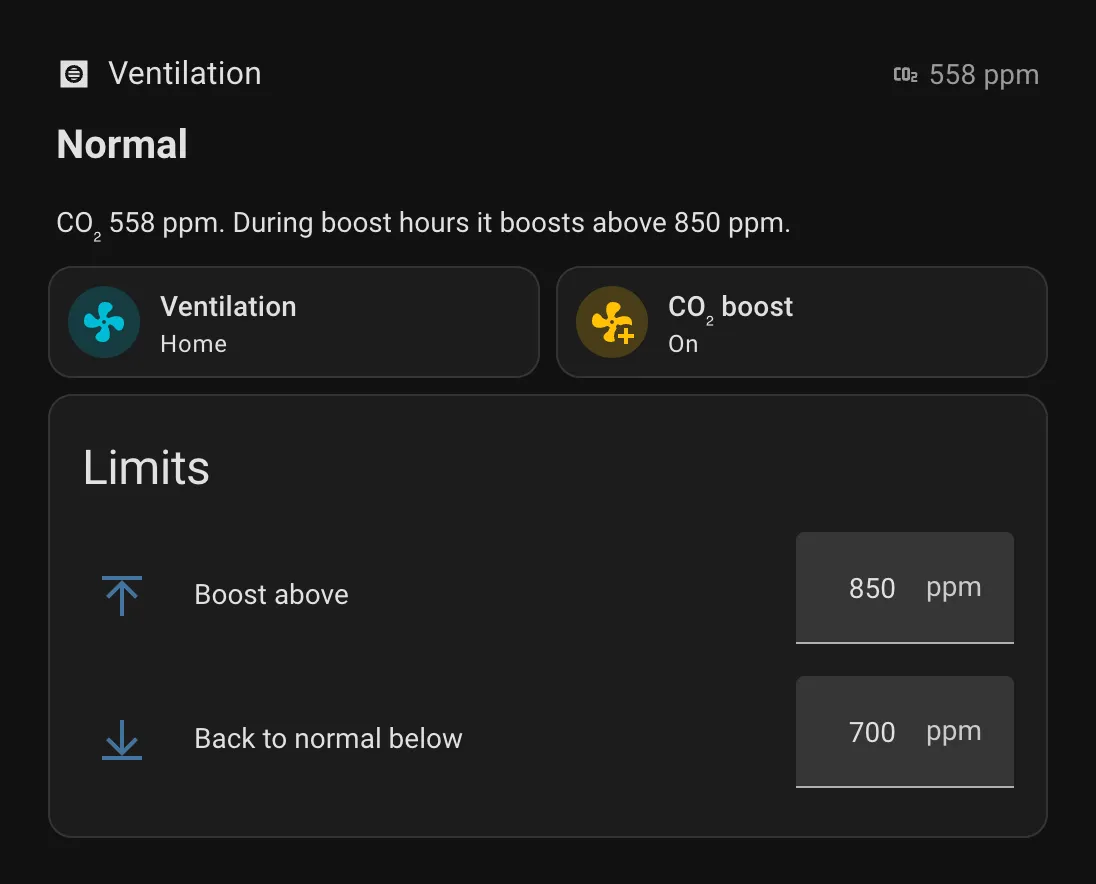
The status line tells you whether the ventilation is boosting, on away or normal, with the CO₂ reading and the limit that applies.
Show the dashboard YAML
# Dashboard section for CO₂ boost and away mode. In a Sections view: add section → ⋮ → Edit in YAML, paste this.type: gridcards: - type: heading heading: Ventilation heading_style: title icon: mdi:hvac badges: - type: entity entity: sensor.bedroom_co2 show_icon: true icon: mdi:molecule-co2 show_state: true - type: markdown text_only: true grid_options: columns: full content: |- {%- set co2 = states('sensor.bedroom_co2') | float(none) -%} {%- set above = states('input_number.co2_boost_above') | int(0) -%} {%- set below = states('input_number.co2_boost_below') | int(0) -%} {%- set preset = state_attr('fan.ventilation', 'preset_mode') -%} {%- if states('zone.home') | int(0) == 0 -%} ## Away mode Nobody is home, so the ventilation runs on the away setting. {%- elif preset == 'Boost' -%} ## Boosting CO₂ {{ co2 | int(0) }} ppm. Back to normal once it stays below {{ below }} ppm. {%- elif is_state('input_boolean.co2_boost_enabled', 'off') -%} ## Boost off The ventilation stays on its normal setting whatever the CO₂. {%- else -%} ## Normal CO₂ {{ co2 | int(0) }} ppm. During boost hours it boosts above {{ above }} ppm. {%- endif -%} - type: tile entity: fan.ventilation name: Ventilation vertical: false grid_options: columns: 6 state_content: preset_mode - type: tile entity: input_boolean.co2_boost_enabled name: CO₂ boost icon: mdi:fan-plus vertical: false grid_options: columns: 6 tap_action: action: toggle icon_tap_action: action: toggle - type: entities title: Limits state_color: false grid_options: columns: full entities: - entity: input_number.co2_boost_above name: Boost above - entity: input_number.co2_boost_below name: Back to normal belowGood to know
- Why boost hours. A bedroom sensor matters most at night, so boosting is limited to those hours. Change the start and end to suit the room your sensor is in.
- The away setting wins. If everyone leaves during a boost, the ventilation goes to away straight away.
- Some units limit boost time. If your unit ends a boost on its own timer, the automation starts it again only when CO₂ crosses the upper limit the next time.